

7 Smart Home Automation Kits You Can Buy Online
Last Updated: November 21, 2026
Quick Summary
To buy smart home kits online, match the kit to your home first, then your budget: a Wi-Fi or Matter starter bundle with a hub, two sensors, and a smart plug is a common choice for many buyers. Check the protocol, hub requirement, and three-year cost before checkout.
- A Wi-Fi starter bundle needs no hub and typically costs $80 to $180.
- If you plan to expand past 10 devices, spend an extra $40 to $80 on a kit with a real hub.
- A $120 security kit with a $5-per-month plan costs $300 over three years.
- Most home routers handle 20 to 30 connected devices before latency and dropouts appear.
- Renters should favor plug-in kits with no wall switches.
Table of Contents
- Why Buying Smart Home Kits Online Beats Piecemeal Shopping
- Quick Comparison: Smart Home Starter Kits at a Glance
- What Smart Home Automation Cost Really Includes
- Smart Home Device Compatibility: Protocols, Hubs, and Apps
- When an Arduino Smart Home Kit Makes Sense
- Matching a Kit to Your Home, Budget, and Skill Level
- Order Your Smart Home Kit from Brightvie
- Frequently Asked Questions
Why Buying Smart Home Kits Online Beats Piecemeal Shopping
If you want to buy smart home automation kits online, bundling beats buying parts one at a time. A starter kit arrives with the hub, sensors, and switches already chosen to work together, so setup takes an afternoon instead of a month of returns.
The piecemeal approach has a hidden tax. You buy a smart plug, discover it needs a hub you don't own, then order the wrong hub. A kit removes that guesswork.
Below, we rank seven kit types by home size, budget, and skill level, and we explain what smart home automation cost really includes. But first, here is what most guides get wrong: they treat every kit as interchangeable. It isn't. Protocol and hub design decide whether your kit still works two years from now.
Quick Comparison: Smart Home Starter Kits at a Glance
A Wi-Fi or Matter starter bundle with a hub, two sensors, and a smart plug is a common choice for many buyers. Match the kit to your home first, then to your budget. The table below ranks seven kit types by how much decision support they give a first-time buyer, and it lists the protocol, the hub requirement, and the typical price band so you can compare like with like.
| Rank | Kit type | Best for | Protocol | Hub needed? | Typical contents | Typical price band | Setup effort |
|---|---|---|---|---|---|---|---|
| 1 | Wi-Fi starter bundle | Apartments, renters | Wi-Fi | No | Hub or bridge, 2 sensors, 1 plug | $80-$180 | Low |
| 2 | Matter/Thread kit | Future-proofing | Matter over Thread | Thread border router | Border router, 2-4 sensors, 1 plug | $120-$250 | Low-medium |
| 3 | Zigbee or Z-Wave kit | Whole-home builds | Zigbee or Z-Wave | Yes | Hub, 2 switches, 3-5 sensors | $150-$350 | Medium |
| 4 | Security-focused kit | Entryways, garages | Wi-Fi or Z-Wave | Sometimes | 2 cameras, 2 door sensors, siren | $150-$400 | Low |
| 5 | Lighting kit | Living rooms, bedrooms | Wi-Fi, Zigbee, or Matter | Sometimes | 4 bulbs or 2 switches, bridge | $60-$200 | Low |
| 6 | Climate kit | Two-story homes | Wi-Fi or Zigbee | Sometimes | Thermostat, 2-3 temp sensors | $130-$300 | Medium |
| 7 | Arduino kit | Tinkerers | None (wired) | No | Board, modules, wiring | $40-$120 | High |
Best for: first-time buyers who want one app and one support contact. Skip if: you already own devices on a different protocol, because a second hub and a second app usually cost more than the kit saves.
How to read the shortlist
Rank is not the same as "best for everyone." Rank reflects how much of the decision the kit makes for you. A Wi-Fi starter bundle ranks first because it needs no hub, pairs in minutes, and covers the three automations most people actually use: motion-triggered lights, a scheduled plug, and a door-open alert.
A common pattern is that buyers overpay on the first kit and underpay on the hub. If you plan to expand past 10 devices, spend the extra $40-$80 on a kit with a real hub rather than a Wi-Fi-only bundle, because replacing a hub later means re-pairing every device you own.
What the price band does and does not include
A kit's listed price typically covers the kit box only, and subscriptions, extra sensors, batteries, or professional installation may be additional costs. A $120 security kit with a $5-per-month recording plan costs $300 over three years, which is more than a $250 subscription-free kit. Compare kits on three-year cost, not sticker price, and confirm the return window before you open the box, because some retailers charge a restocking fee on opened smart home hardware.
Watch out: a kit advertised as "hub-free" may still require a bridge for its sensors, so read the included-components list line by line before checkout.
Typical price bands for smart home kit types
What Smart Home Automation Cost Really Includes
The sticker price is only part of the story. Smart home automation cost usually breaks into several buckets: the kit itself, any extra sensors you add later, a hub if your kit doesn't include one, and your time.
Most buyers underestimate the fourth bucket. A kit with a clean app setup takes an evening. A kit that needs device-by-device pairing can eat a weekend.
Watch out: subscription fees are the quiet budget killer. Some camera and monitoring kits charge monthly for recording or alerts. Check before checkout, because a "cheap" kit with a recurring fee costs more over three years than a pricier subscription-free one. If you want a benchmark for what individual devices run, our breakdown of the average cost of a smart home device puts kit pricing in context.
Smart Home Device Compatibility: Protocols, Hubs, and Apps
Compatibility is the single most important spec on any smart home kit. A kit works when its devices speak the same protocol and report to the same app. Most buying guides stop there. This section goes further: it explains what each protocol costs you in hubs, device limits, and reliability, so you can predict whether a kit still works two years from now.
Protocol-by-protocol guidance for beginners
- Wi-Fi: No hub required, and setup is the simplest. The trade-off is that every Wi-Fi device occupies a slot on your router, and most home routers handle 20-30 connected devices comfortably before latency and dropouts appear. Best for apartments and small kits under 15 devices.
- Zigbee: A low-power mesh that needs its own hub. Devices route through each other, so reliability improves as you add powered devices. Best for whole-home sensor networks where you want long battery life.
- Z-Wave: Also a mesh, also hub-dependent, and it uses a different radio band than Wi-Fi and Zigbee, which reduces interference. Z-Wave devices from different brands generally interoperate, which is why it is common in security kits.
- Thread: A low-power mesh that uses the same radio as Zigbee but speaks IP natively. It needs a Thread border router, which is built into some hubs, smart speakers, and routers. Thread is the transport most Matter devices use today.
- Matter: A standard, not a radio. A Matter device still runs on Wi-Fi, Thread, or Ethernet underneath. Buy Matter-certified kits if you want cross-ecosystem control and a longer support horizon.
The three checks before you buy
Before you buy smart home kits, check three things:
- Does the kit list every protocol it supports, including the radio inside each sensor?
- Will it control devices you already own, or will it need a second hub and a second app?
- Does it work with your voice assistant, and does that integration require a manufacturer cloud account?
A common pattern is that a kit lists "Matter compatible" but ships sensors that are Zigbee-only and reach Matter through the hub. That is fine, but it means the hub is mandatory, not optional. Confirm which devices are native Matter and which are bridged.
Privacy, local control, and account requirements
Compatibility also decides how much of your home depends on someone else's cloud. Some kits run automations locally on the hub and keep working when the internet is down; others route every command through a manufacturer server. Ask three questions before checkout: Does the kit require an account?
For a deeper walkthrough, see our guide on how to make smart home devices compatible. If you are still choosing a hub, our roundup of the best smart home hub for beginners covers the entry-level options. And if you are torn between the two biggest ecosystems, this Matter vs Zigbee comparison settles it.
Watch out: pairing a Zigbee sensor to a Z-Wave hub will fail every time, and no app update fixes a radio mismatch, check the protocol on the box, not the product photo.
When an Arduino Smart Home Kit Makes Sense
An Arduino smart home kit is a build-it-yourself bundle: a microcontroller board, sensors, relays, and wiring you program yourself. It makes sense for hobbyists who want full control and don't mind soldering or writing code.
For everyone else, it's the wrong first purchase. Arduino kits reward patience and punish impatience. A common mistake is buying one to save money, then discovering the real cost is evenings spent debugging.
If you enjoy the tinkering, an Arduino kit teaches you how automation actually works. If you just want lights that respond to sunset, buy a finished kit instead.
Matching a Kit to Your Home, Budget, and Skill Level
Start with your home, not the product page. The right kit depends on square footage, wall construction, and how much setup you'll tolerate.
Use this checklist before you order:
- Count the rooms you want to automate first
- Confirm your Wi-Fi reaches the farthest room
- List devices you already own and their protocols
- Decide your ceiling budget, including any subscriptions
- Rate your comfort with wiring on a 1-5 scale
- Check the return window and warranty length
Renters should favor plug-in kits with no wall switches. Homeowners planning to stay can invest in wired switches and a hub. A two-story house usually needs a climate kit plus a lighting kit, not one giant bundle.
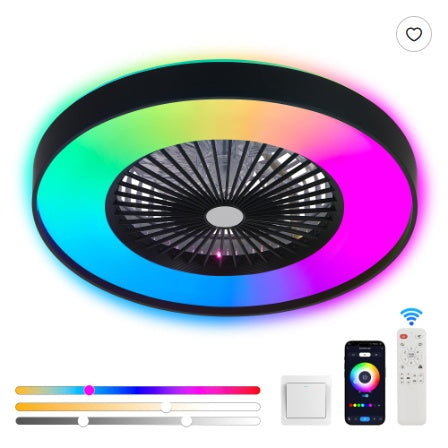
One product worth considering alongside a climate-focused kit is our 23-inch smart ceiling fan with RGB LED light. It offers app and remote control, six speeds, and a reversible DC motor, and it fits bedrooms, living rooms, and dining areas. Professional installation is recommended, so confirm ceiling-box and electrical compatibility first.
Order Your Smart Home Kit from Brightvie
Buying smart home kits online comes down to trust: the right products, clear compatibility info, and a return path that actually works. That is where we built Brightvie around you.
When you order from us, you get fast US shipping with tracking on every order, secure checkout, and a 30-day money-back guarantee. Not sure which kit fits your home? And if you are wondering why a specialty retailer beats a general marketplace, read why buy smart home gadgets from specialty retailers.
The hardest part of buying a smart home kit is knowing which one fits your home and your existing devices. Brightvie takes that guesswork off your plate with a carefully curated product selection, personalized support to match a kit to your space, and a 30-day money-back guarantee if it isn't right.
Frequently Asked Questions
What should I look for when buying a smart home starter kit?
Check three things before you buy: the protocol the kit uses (Wi-Fi, Zigbee, Z-Wave, Matter, or Thread), whether it includes a hub or controller, and what the app supports. A good starter kit covers lighting control, motion detection, and climate control in one bundle. Confirm the return window and whether setup help is included, since a kit you cannot configure is money wasted.
How much does smart home automation cost?
Cost depends on scope. Cost depends on scope, and the price of a starter kit or whole-home setup varies with the devices you choose. Subscription-free systems save money long term. Always factor in installation if you are not comfortable wiring switches or mounting sensors yourself.
Are smart home devices compatible across different brands?
Not always, but the situation has improved. Matter and Thread are designed to let devices from different brands work together, and Zigbee and Z-Wave devices interoperate through a compatible hub. Wi-Fi devices usually work independently through their own apps. Before buying, check that your chosen controller supports the protocol your devices use, and confirm voice control works with your assistant.
Is an Arduino smart home kit suitable for beginners?
An Arduino smart home kit is a DIY electronics project, not a plug-and-play bundle. It suits people who enjoy coding and wiring, and it can be cheaper for simple sensor projects. Beginners who want app control, voice control, and reliable daily use are better served by a consumer starter kit with a hub. Choose Arduino only if learning is part of the goal.
